Skenarios support
Export property data in an Excel file
- Peter Sundell
- Hannu Nikupeteri
You can export an Excel document on Skenarios service's Export-page. The exported Excel contains two sheets, one for buildings and one for units. Please, note that all the information uploaded into the Skenarios' service by Excel Import may not be included in the exported Excel*, hence we recommend you to save your original Excel file to prevent possible loss of information.
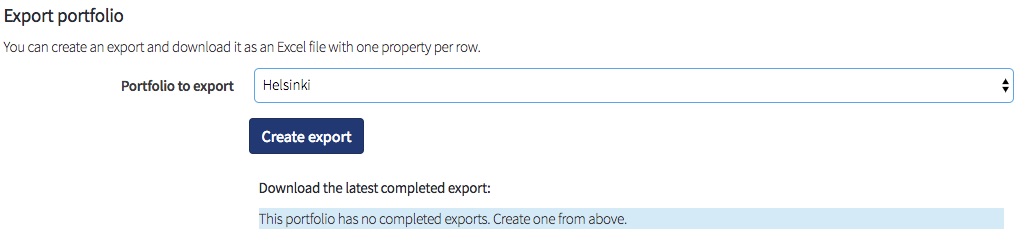
How to
Go to the Export&Import view.
Choose a portfolio to be exported; portfolio 'Helsinki' is chosen in the adjacent figure.
Click 'Create Export', the export process will start. For small portfolios, the download link will appear almost immediately and you can download the export file.
For large portfolios, the processing will take a while and the link will appear once the export is done. You will get a notification if this is the case. You can see the completed export file when you refresh the page.
Renovations
An exported Excel represents building level renovations for the next decade in great detail. Each year has its own column for yearly total renovation costs, and the following column presents the details of the total costs. The details column manifests the renovated building parts and their costs. The exported Excel contains also a column for the total renovation costs in a decade per a building floor area.
Building details sheet
| Column title | Description |
|---|---|
| Building ID | Identifies a building uniquely in a portfolio |
| Building Name | Name of the building |
| Group id | Identifies a group uniquely in a portfolio |
| Group name | Name of the property group |
| Building prototype | Type of the property |
| Usage purpose | Usage code of the building. 11 stands for residential. |
| Address | The street address of a building. |
| Floors | The number of floors in a building. |
| Build Year | The construction year of a building. |
| Floor Area | The gross floor area of a building in square meters. |
| Facade Area | The gross facade area of a building in square meters. |
| Heating | The heating source of a building. |
| Electricity | The electricity source of a building. |
Electricity Demand (kWh/m2/a) | Electricity consumption of the property. |
Heating Demand (kWh/m2/a) | Heating consumption of the property. |
Cooling Demand (kWh/m2/a) | The cooling demand of the property. |
Solar Potential (kWh/a) | Potential solar energy production of a building, if the building rooftop is equipped with solar panels. |
<year> renovations | Yearly renovation costs of a building given in local currency. Contains both Assumed and Planned renovations. |
<year> renovation details | Details of yearly renovation costs. Renovated parts and their costs in a given year are listed. Contains both Assumed and Planned renovations. |
| Decade total costs | Total costs of 10 years renovations |
Decade costs per floor area | Total renovation costs of the upcoming decade of a building given in local currency. Contains both Assumed and Planned renovations. |
Unit details sheet
If the portfolio has any units, the second sheet has details of them.
| Column | Description |
|---|---|
| Unit ID | Identifies the unit uniquely in a portfolio |
| Building ID | Identifies the building uniquely in a portfolio |
| Group ID | Identifies the group uniquely in a portfolio |
| Unit Name | Name of the unit |
| Description | Description of the unit |
| Address | Address of the unit |
| Estimated unit value | The latest estimated value of the unit |
| Floor area | Floor area of the unit |
| Floor | Floor number of the unit |
| Bathroom renovation & Cost | Year and cost of the next coming renovation |
| Kitchen renovation & Cost | Year and cost of the next coming renovation |
| Heating system renovation & Cost | Year and cost of the next coming renovation |
| Maintenance | List of last 5 years maintenances done to this unit |
| Total cost | Total cost of the previous maintenances |
| Maintenance description | Descriptions of the previous maintenance works |
*One example of such information is past renovations.
SkenarioLabs